
Best Clay.com Alternatives: Why Google Sheets, Excel & Airtable + Tomba.io Beat Clay

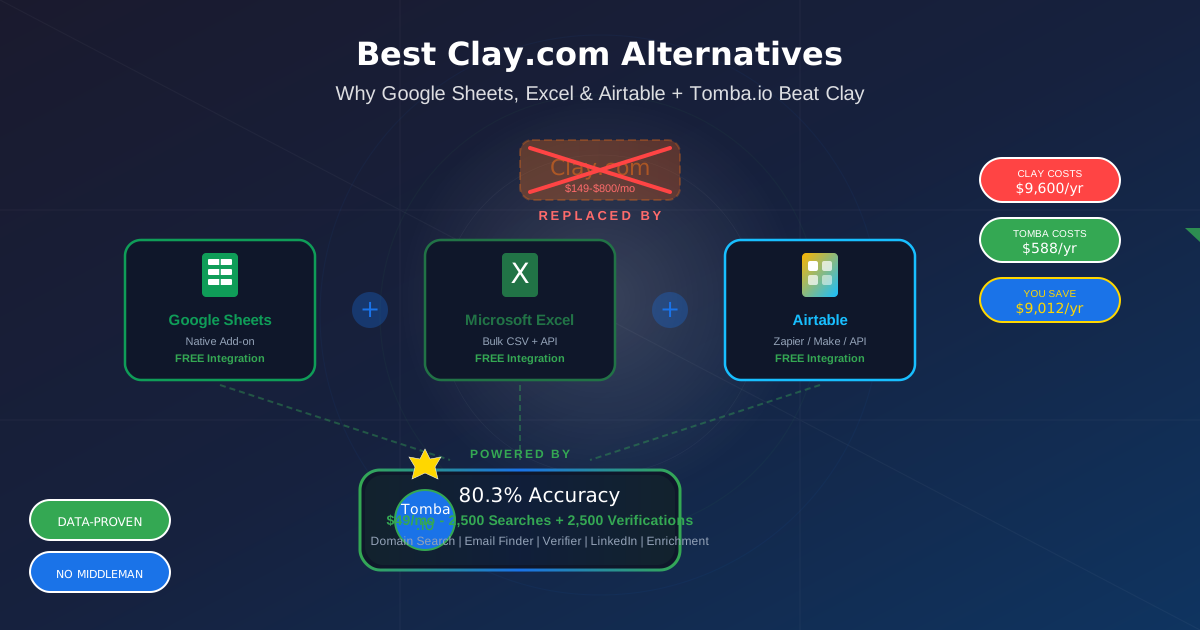
Clay charges $149 to $800 per month for a data enrichment platform that acts as a middleman between you and the tools that actually find emails. No original data. No public accuracy benchmarks. No transparency. Just a fancy UI that connects to other people's APIs and charges you a premium for the privilege.
Here's what Clay doesn't want you to know: you already have better alternatives sitting in your browser right now. Google Sheets. Microsoft Excel. Airtable. Pair any of them with Tomba.io - the #1 most accurate email finder at 80.3% - and you get everything Clay promises at a fraction of the cost.
Tomba.io has native integrations with all three. No middleman. No markup. No $800/month "enrichment tax." Just direct access to the most accurate email data in the industry, plugged straight into the spreadsheet or database you already use.
In this guide, we'll show you exactly how Google Sheets + Tomba.io, Excel + Tomba.io, and Airtable + Tomba.io each replace Clay completely - and why 5 specific Tomba.io tools make Clay irrelevant.
Why Clay Sucks: 5 Problems You Can't Ignore
Let's be direct. Clay is a bad product for most businesses. Here's why:
1. Overpriced Middleman ($149-$800/Month)
Clay doesn't find emails. Clay doesn't verify emails. Clay doesn't have its own database. Clay is a middleman that connects to third-party data providers and charges you $149 to $800 per month for the connection. You're paying premium prices for a UI layer on top of tools you could use directly.
| Clay Plan | Monthly Cost | Annual Cost |
|---|---|---|
| Starter | $149/mo | $1,788/yr |
| Explorer | $349/mo | $4,188/yr |
| Pro | $800/mo | $9,600/yr |
| Tomba.io | $49/mo | $588/yr |
Save $1,200 to $9,012 per year by skipping Clay entirely.
2. Zero Transparency on Data Quality
Clay pulls data from multiple third-party sources but publishes zero accuracy benchmarks. You have no idea what percentage of emails are valid. You have no public test data. You have no Google Sheets proof.
Tomba.io proves its accuracy: 80.3% across 5,000 queries, all data in public Google Sheets:
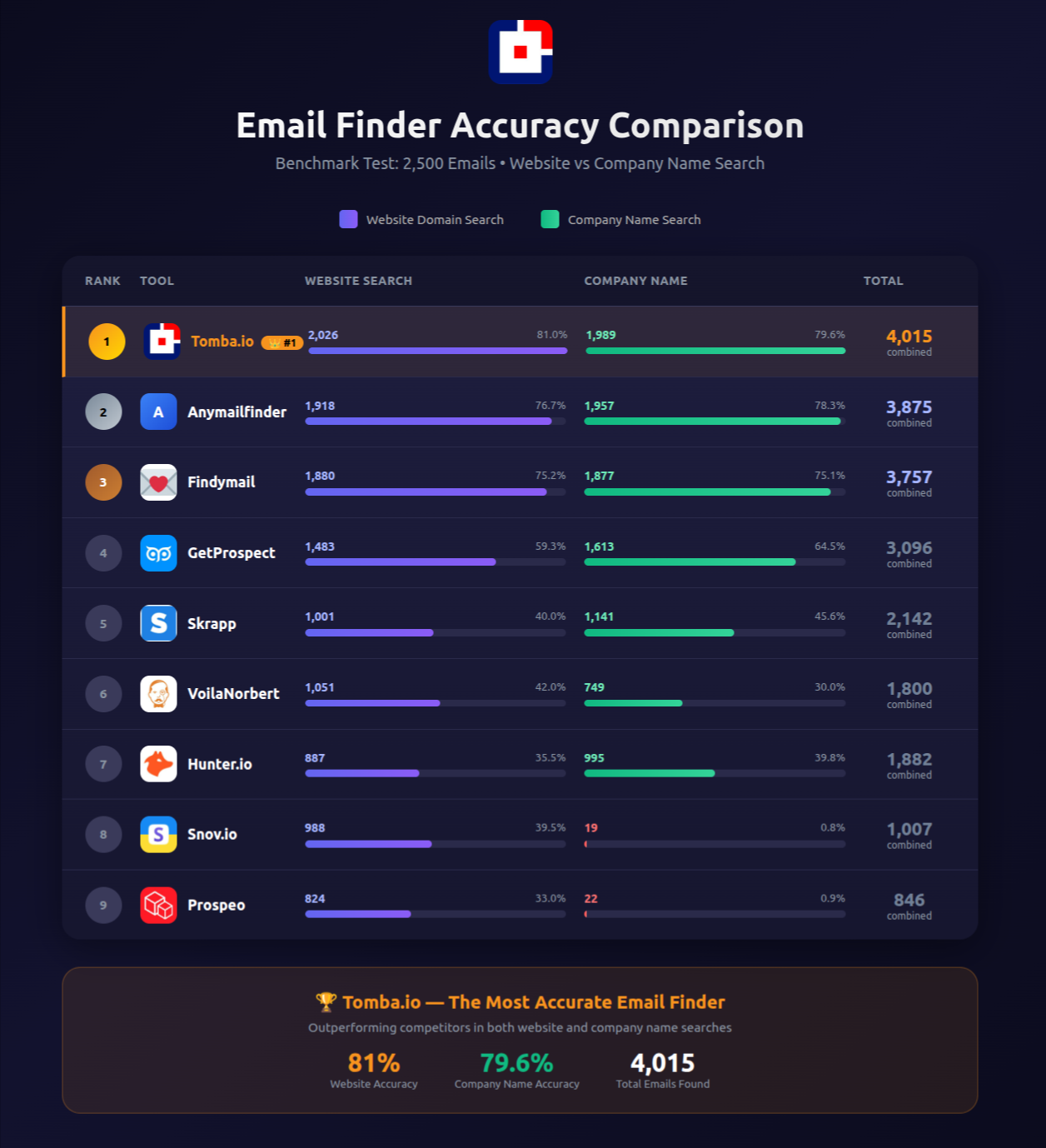
- Website Search (81.0%): View Proof Data
- Company Name Search (79.6%): View Proof Data
3. Overcomplicated for Simple Tasks
Need to find emails for a list of companies? Clay wants you to build a multi-step "waterfall enrichment" workflow with credits, columns, and complex logic. Tomba.io + Google Sheets does it in one click. Clay makes simple things complicated to justify its price tag.
4. Credit System Is a Trap
Clay's credit system is confusing by design. Different actions cost different credits. You run out mid-workflow. You upgrade. You run out again. Tomba.io: 2,500 searches + 2,500 verifications for $49/month. Simple. Predictable. No credit math required.
5. Only Partners With Select Data Providers
Clay only shares data from its partners - the ones that pay to be on its platform. This is not objective data comparison. It's advertising disguised as enrichment. You're not getting the best data. You're getting the data Clay profits from.
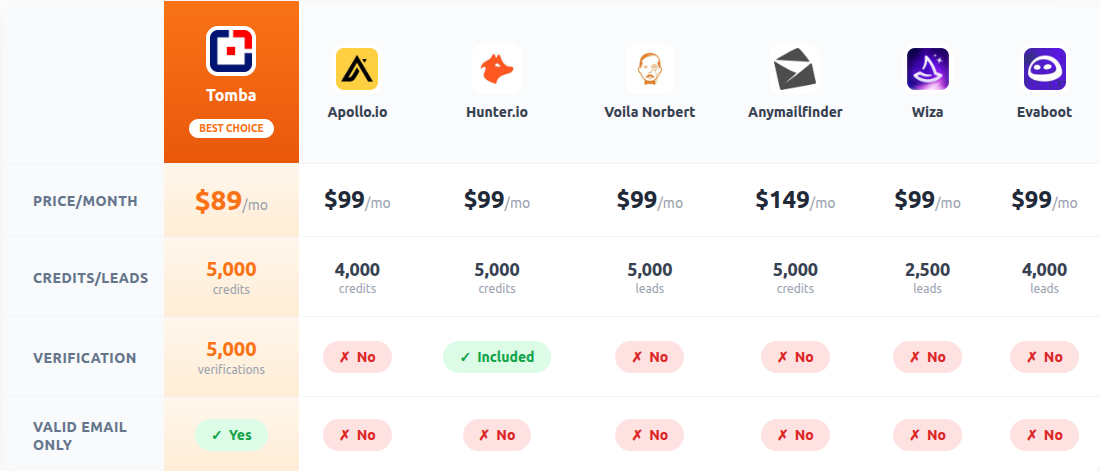

The 3 Best Clay Alternatives (You Already Have Them)
Alternative #1: Google Sheets + Tomba.io
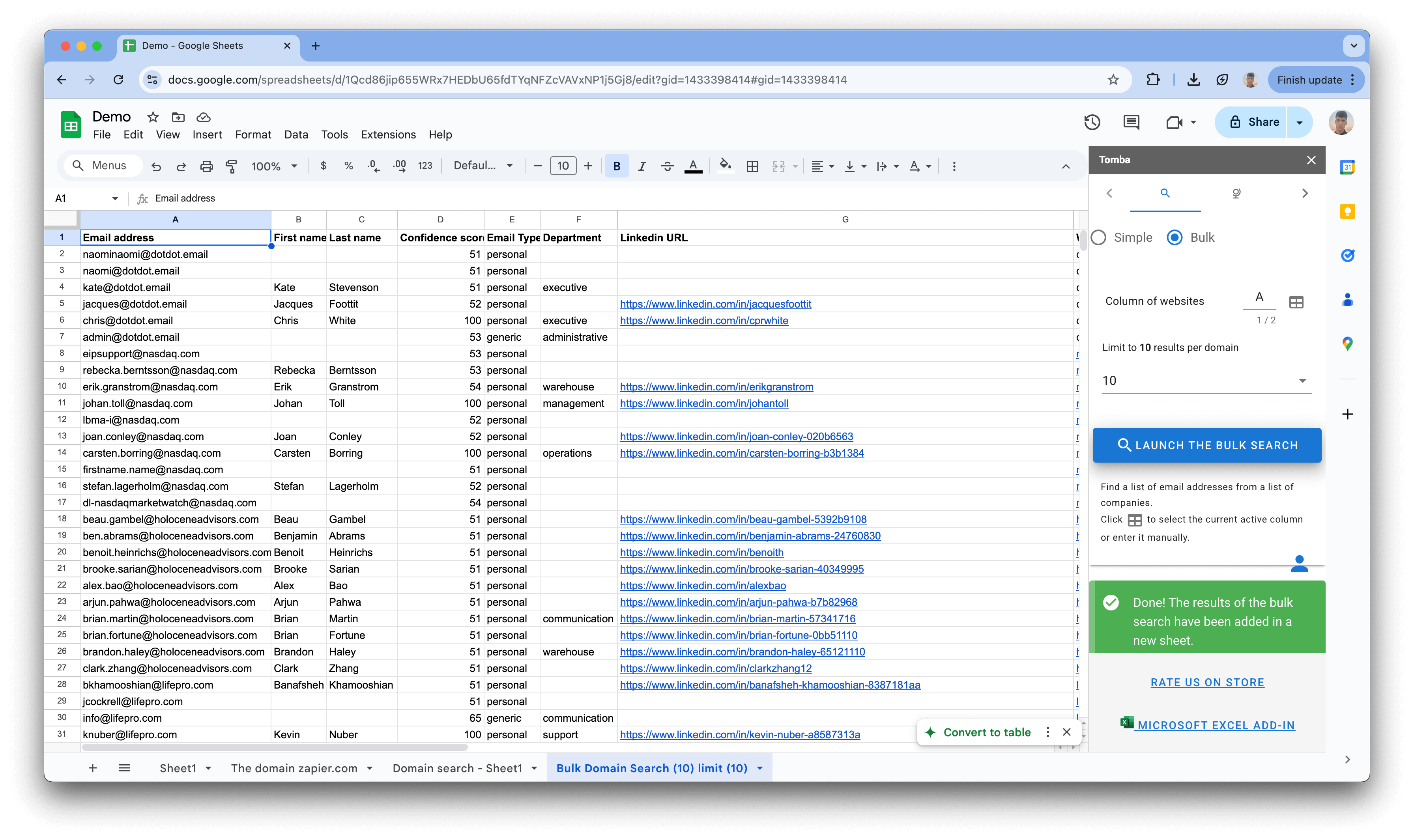
Tomba.io has a native Google Sheets add-on that turns your spreadsheet into a powerful email enrichment machine. No middleman. No Clay credits. No complex workflows.
How it works:
- Install the Tomba Google Sheets Add-on
- Paste your list of domains or company names
- Click "Find Emails" - Tomba enriches every row directly
- Emails arrive verified with 80.3% accuracy
- Run bulk verification on the results - FREE with your plan
What you can do in Google Sheets + Tomba.io:
| Capability | Google Sheets + Tomba | Clay |
|---|---|---|
| Domain Search | Direct in sheets | Via credits |
| Email Finding | Native add-on | Third-party waterfall |
| Email Verification | FREE (2,500/mo) | Extra credit cost |
| Bulk Enrichment | One-click | Multi-step workflow |
| Collaboration | Built into Sheets | Separate sharing |
| Cost | $49/mo | $149-800/mo |
| Accuracy Proof | 80.3% public data | None |
Real example: Paste 500 company domains into Column A. The Tomba add-on fills Column B with verified emails, Column C with confidence scores, Column D with job titles. Done. No waterfall. No credits. No $800 invoice.
"The best tool is the one your team already uses. Google Sheets is where 80% of sales teams manage their prospecting lists. Adding Tomba.io directly into Sheets eliminates the need for a separate enrichment platform entirely."
SaaS Workflow Optimization Report
Alternative #2: Microsoft Excel + Tomba.io
For teams on Microsoft 365, Tomba.io integrates directly with Excel through its API and bulk tools. Enterprise-grade email enrichment without the enterprise-grade Clay invoice.
How it works:
- Export your prospect list from your CRM to Excel
- Use Tomba Bulk Email Finder to process the list
- Download enriched results back into Excel
- Verify with Tomba Bulk Email Verifier - FREE
- Import clean, verified data back to your CRM
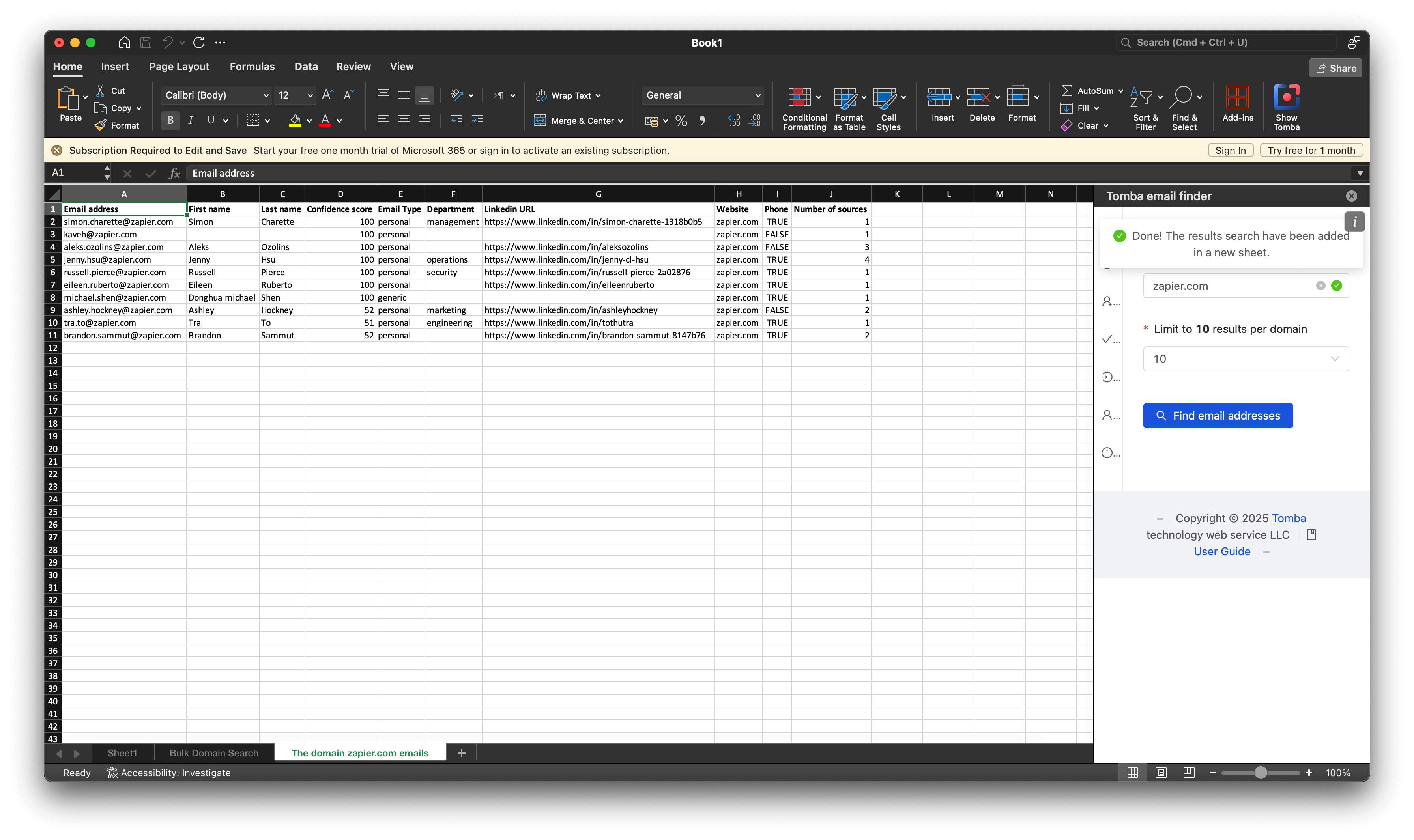
What you can do in Excel + Tomba.io:
| Capability | Excel + Tomba | Clay |
|---|---|---|
| Bulk Processing | Upload CSV, get results | Credit-based waterfall |
| Email Verification | FREE bulk verify | Extra cost |
| Offline Access | Full Excel capabilities | Cloud-only |
| Data Security | Your files, your control | Clay's servers |
| Enterprise Ready | Microsoft 365 ecosystem | Separate platform |
| Cost | $49/mo | $149-800/mo |
For enterprise teams: Excel + Tomba.io keeps your data in the Microsoft ecosystem your IT team already manages. No new vendor approvals. No new security reviews for Clay's platform. Just email enrichment through a tool that works with what you have.
Alternative #3: Airtable + Tomba.io
Tomba.io connects with Airtable
How it works:
- Create your prospect base in Airtable
- Connect Tomba.io via Zapier/Make or Tomba API
- Set up automation: new record triggers Tomba email search
- Emails populate automatically with verification status
- Filter, sort, and segment directly in Airtable's powerful views
What you can do in Airtable + Tomba.io:
| Capability | Airtable + Tomba | Clay |
|---|---|---|
| Automated Enrichment | Zapier/Make triggers | Built-in (with credits) |
| Custom Views | Kanban, Calendar, Gallery | Table only |
| Team Collaboration | Built into Airtable | Separate sharing |
| Relational Data | Linked records | Flat tables |
| Verification | FREE (2,500/mo) | Extra cost |
| Cost | $49/mo + Airtable free tier | $149-800/mo |
The automation advantage: Airtable + Tomba.io + Zapier creates a self-running enrichment engine. Add a company name to your Airtable base, and Tomba automatically finds and verifies the email. No manual steps. No Clay credits draining in the background.
5 Tomba.io Tools That Make Clay Irrelevant
Clay aggregates other tools. Tomba.io IS the tool. Here are 5 Tomba.io features that replace everything Clay offers:
Tool #1: Domain Search
Tomba Domain Search finds every email address associated with a company domain. Enter "microsoft.com" and get a complete list of verified emails with names, job titles, and departments.
- Accuracy: 81.0% for website/domain searches (View proof)
- Results: Up to 100+ emails per domain
- Filters: Department, seniority, name
- Output: Export to CSV, Google Sheets, or use via API
- Clay equivalent: "Company enrichment" waterfall that costs credits per lookup
Why it's better than Clay: Direct results from Tomba's own database. No middleman markup. No credit math. One search, verified results.
Tool #2: Email Finder
Tomba Email Finder finds a specific person's email when you have their name and company. The most common use case in sales prospecting.
- Accuracy: 80.3% combined across both search methods
- Input: Name + company domain or company name
- Output: Verified email with confidence score
- Speed: Real-time results
- Clay equivalent: "Person enrichment" that burns through credits
Why it's better than Clay: Tomba finds the email directly from its 500M+ database. Clay asks a third-party provider to find it for you, then charges you for the introduction.
Tool #3: Email Verifier
Tomba Email Verifier checks if an email address is valid, catch-all, unknown, invalid, or disposable. 2,500 verifications per month are FREE with every Tomba plan.
- Accuracy: 99%+ verification accuracy
- Bounce rate: Keeps you below 5%
- Catch-all detection: Advanced algorithms for accept-all domains
- Bulk verify: Process entire lists at once
- Clay equivalent: Verification costs extra credits
Why it's better than Clay: Clay doesn't include verification - it costs more credits. Tomba includes 2,500 free verifications per month. That's $29+ in value Clay charges extra for.
Tool #4: LinkedIn Email Finder
Tomba LinkedIn Finder extracts verified email addresses from LinkedIn profiles. Use the Chrome Extension to find emails while browsing LinkedIn - the same workflow Clay's users think they need Clay for.
- Works on: LinkedIn profiles, company pages
- Auto-verify: Every email found is pre-verified
- Chrome Extension: One-click from any LinkedIn profile
- Bulk: Process multiple LinkedIn profiles
- Clay equivalent: LinkedIn enrichment waterfall
Why it's better than Clay: Same LinkedIn email finding, but directly through Tomba's Chrome extension. No Clay login required. No credit system. Click a profile, get an email.
Tool #5: Email Enrichment
Tomba Enrichment takes an email address and returns the full profile: name, job title, company, social profiles, and more. Turn a simple email into a complete contact record.
- Data returned: Name, title, company, location, social links
- Bulk enrichment: Process entire lists
- API access: On all plans at $49/mo (API docs)
- Integrations: Google Sheets, Zapier, Make, n8n
- Clay equivalent: "Enrichment waterfall" - Clay's entire selling point
Why it's better than Clay: Tomba enriches from its own data. Clay enriches by querying other tools and marking up the price. Same result, fraction of the cost.

The Cost Comparison That Kills Clay
Let's do the annual math for a typical sales team:
| What You Need | Tomba.io + Sheets/Excel/Airtable | Clay |
|---|---|---|
| Email Finding | $49/mo (2,500 searches) | $149-800/mo (credit-based) |
| Email Verification | FREE (2,500/mo included) | Extra credits |
| Spreadsheet Integration | FREE (native) | Not available |
| LinkedIn Finding | Included | Extra credits |
| Enrichment | Included | Extra credits |
| API Access | Included | Higher plans |
| Annual Total | $588/year | $1,788-$9,600/year |
| You Save | -- | $1,200 - $9,012/year |
Every feature Clay charges credits for, Tomba.io includes in the $49/month plan. Domain search, email finder, email verifier, LinkedIn finder, enrichment - all included. All with 80.3% proven accuracy.
Who Actually Needs Clay? (Almost Nobody)
Clay makes sense if:
- You need to combine 5+ different data sources in a single workflow
- You have an enterprise budget ($800+/mo) and don't care about cost
- You specifically need Clay's "waterfall" logic across multiple providers
- You've already tried everything else and have a very niche use case
Clay does NOT make sense if:
- You need email finding (Tomba does it better and cheaper)
- You need email verification (Tomba includes it free)
- You need domain/company search (Tomba does it directly)
- You need LinkedIn prospecting (Tomba's Chrome extension does it)
- You work in Google Sheets, Excel, or Airtable (Tomba integrates natively)
- You care about accuracy proof (Tomba publishes data; Clay doesn't)
- You care about budget (Tomba is $49/mo; Clay starts at $149/mo)
That covers about 95% of the people considering Clay.
How to Replace Clay Today (10-Minute Setup)
For Google Sheets Users:
- Go to Tomba Google Sheets Add-on
- Install in one click
- Start finding emails directly in your spreadsheet
- You just replaced Clay. Time: 2 minutes.
For Excel Users:
- Sign up at tomba.io
- Use Bulk Email Finder to upload your CSV
- Download enriched results back to Excel
- Clay replaced. Time: 5 minutes.
For Airtable Users:
- Sign up at tomba.io
- Connect via Tomba API or Zapier
- Set up automated enrichment triggers
- Clay replaced with automation. Time: 10 minutes.
Frequently Asked Questions
Is Tomba.io really a Clay alternative?
Yes - and a better one for email finding. Clay is a data enrichment middleman. Tomba.io is the actual email finding engine with 80.3% proven accuracy, native integrations with Google Sheets, Excel, and Airtable, and 5 core tools (Domain Search, Email Finder, Email Verifier, LinkedIn Finder, Enrichment) all included at $49/month. Clay charges $149-800/month for access to third-party data through its platform.
Can Google Sheets + Tomba.io really replace Clay?
For email finding and enrichment, absolutely. The Tomba Google Sheets add-on lets you find emails, verify them, and enrich contacts directly in your spreadsheet. No waterfall workflows. No credit system. Just paste domains and get verified emails. The only thing you lose is Clay's multi-provider waterfall logic - which most teams never use.
What about Clay's data accuracy?
Clay publishes zero accuracy data. No benchmarks. No public tests. No Google Sheets proof. Tomba.io proves 80.3% accuracy across 5,000 queries in public Google Sheets that anyone can verify. When a tool charges $800/month and won't tell you how accurate its data is, that should tell you everything.
Does Tomba.io work with Airtable?
Yes. Tomba.io connects to Airtable through Zapier, Make (Integromat), and direct API integration. Set up automated workflows where new Airtable records trigger Tomba email searches automatically. Visit Tomba Integrations for setup guides.
How much can I save switching from Clay to Tomba.io?
Between $1,200 and $9,012 per year. Clay's Starter plan costs $1,788/year. Clay's Pro plan costs $9,600/year. Tomba.io costs $588/year and includes everything: 2,500 searches, 2,500 verifications, domain search, email finder, LinkedIn finder, enrichment, and API access. All with 80.3% publicly proven accuracy.
The Bottom Line: Clay Is an Expensive Solution to a Problem That Doesn't Exist
You don't need a $149-800/month middleman to find emails. You need an accurate email finder that works with the tools you already use.
Tomba.io gives you:
- 80.3% accuracy - #1 in our 9-tool benchmark, publicly proven
- $49/month - 2,500 searches + 2,500 FREE verifications
- 5 powerful tools - Domain Search, Email Finder, Email Verifier, LinkedIn Finder, Enrichment
- Native integrations - Google Sheets, Excel, Airtable, Zapier, Make, n8n
- Full API access - on all plans, no restrictions
- Complete transparency - every accuracy claim backed by public Google Sheets
Clay gives you:
- Unknown accuracy - zero public data
- $149-800/month - for a middleman layer
- Credit-based everything - confusing and expensive
- No native spreadsheet integration
- Third-party data with markup
The choice is obvious. Stop paying Clay's middleman tax. Start using the tools you already have with the #1 most accurate email finder plugged directly in.
Replace Clay in 2 Minutes
Try Tomba.io Free - Native Google Sheets, Excel & Airtable Integration
$49/mo for everything Clay charges $800/mo for. 80.3% proven accuracy.
Google Sheets: Install Add-on | API: Developer Docs | Pricing: View Plans
